Donna Bea
Executive Virtual Assistant Helping Busy Business Owners Stay Organized & Focused.
5+ Years of Administrative Support Experience

I help business owners and executives stay organized by managing calendars, emails, documents, and day-to-day administrative tasks so you can focus on leading and growing your business.
ABOUT ME
I’m Donna Bea, an Executive Virtual Assistant with over 5 years of administrative support experience.
I specialize in helping business owners regain their time by managing high-level administrative tasks. My goal is to keep your backend operations running smoothly so you can focus on growth.
• Inbox & Calendar Management
• Streamlined Administrative Operations
• Dedicated Support for Executives
Let me handle the details so you can lead with confidence.


5+ Years
Administrative Support Experience

Executive
Assistant Support

Calendar & Email
Management for Busy Leaders
My Process
A simple, organized workflow designed to keep you informed and free up your time.
01
Understand Your Business
I take time to learn your business, priorities, and workflow so I can provide support that fits the way you work.
02
Plan & Stay Organized
I organize calendars, emails, documents, and daily tasks to keep everything on track and make your day easier to manage.
03
Get Things Done
I complete administrative tasks accurately and on time so you can focus on leading your business instead of managing the details.
04
Keep You Updated
You’ll always know what’s getting done. I communicate clearly, meet deadlines, and keep you informed every step of the way.
My goal is simple: help you stay organized, save time, and focus on growing your business while I take care of the day‑to‑day administrative work.
WHAT I OFFER
📋 Administrative Support
Keep your daily operations organized with dependable administrative support. From preparing documents to handling routine tasks, I help keep everything running smoothly behind the scenes.
📧 Email Management
Stay on top of your inbox with organized emails, timely follow-ups, and a system that helps you focus on the conversations that matter most.
📊 Data Entry
Maintain accurate records through careful data entry, database updates, and organized information you can easily access when needed.
📅 Calendar Management
Keep your schedule organized by managing appointments, coordinating meetings, and helping you stay on track throughout the day.
📁 File & Document Organization
Create a well-organized filing system so important documents are easy to find, update, and manage whenever you need them.
🔎 Internet Research
Find reliable information, gather useful resources, and organize research to support informed business decisions.
My Tools
Here are the tools I use to manage tasks, communicate with clients, and keep daily operations running smoothly.
Experienced With

Google Workspace

Microsoft Office

Canva

Zoom

Google Meet

Calendly

ChatGPT
Familiar With

Trello

Notion

ClickUp

Grammarly
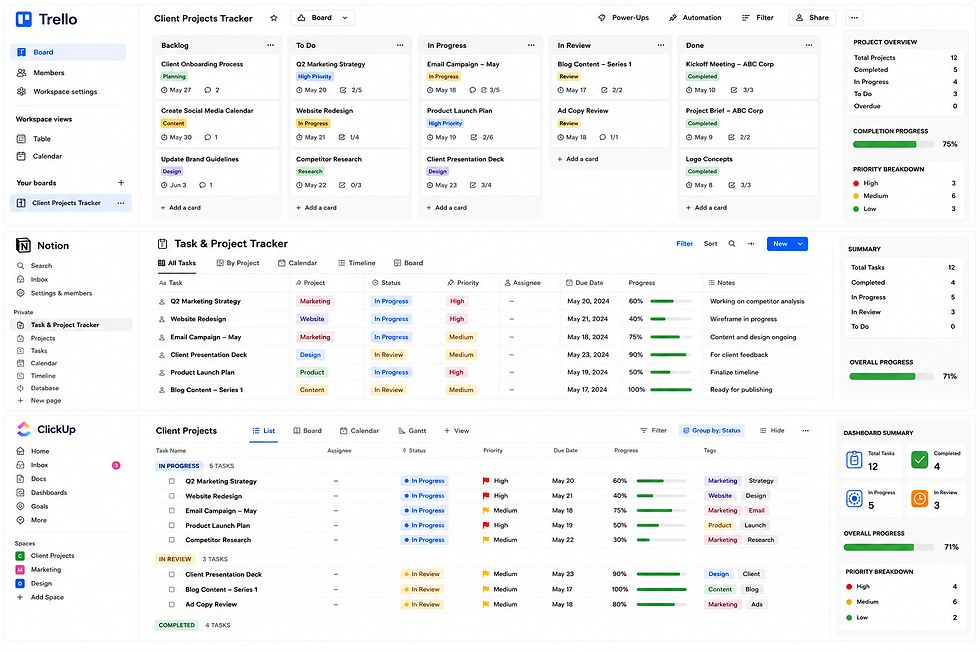
WORK SAMPLES
Realistic systems and templates I use to keep businesses organized and productive.
These portfolio samples showcase how I organize workflows, manage administrative tasks, and build efficient systems that help businesses stay organized and save time.
Portfolio mock samples are provided for demonstration purposes and are based on realistic business scenarios.




Let’s Work Together
Looking to streamline your daily operations?
I am open to new Executive and Virtual Assistant partnerships. If you need a proactive, highly organized professional to handle the details, let's discuss how I can support your goals.
📧 Email: lulldonnabea@gmail.com
📱 WhatsApp: +63 956 002 5226
🟢 Available for Full-Time • Part-Time • Long-Term